Quickly grasp and represent numbers and quantities – the basis for a sound understanding of numbers
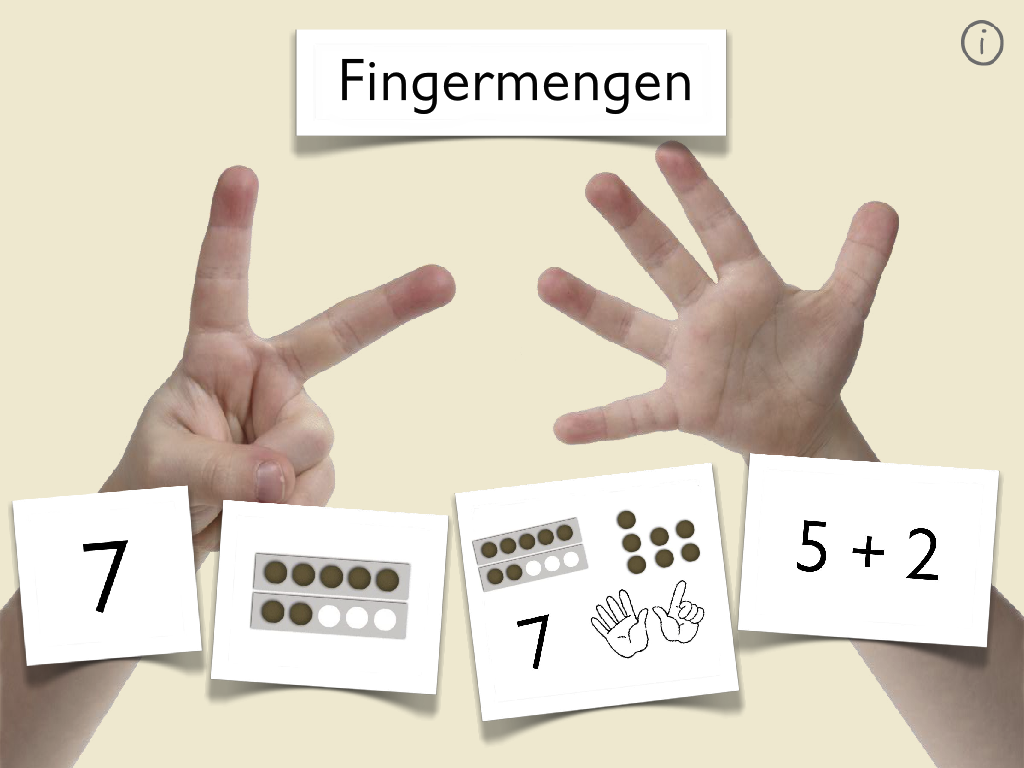
Fingermengen ist eine iPad-App, die Kindern dabei hilft, Anzahlen schnell und ohne Abzählen zu erkennen und mit den eigenen Fingern darzustellen. Durch die einzigartige Kombination aus Erkennung der gleichzeitig aufgelegten Finger und strukturierten Lernaufgaben werden grundlegende mathematische Kompetenzen auf spielerische Weise gefördert.
The app was specifically designed for use in elementary school (beginning classes) and supports teachers in promoting their students' understanding of numbers. The simultaneous recognition of quantities and their representation with the fingers forms the basis for all further mathematical operations.
Fingermengen nutzt Multitouch-Technologie zur Erkennung von Handbewegungen. Kinder berühren mit der entsprechenden Anzahl Finger gleichzeitig den Bildschirm – die App erkennt präzise, ob die richtige Menge dargestellt wurde. Es geht darum, die Anzahl möglichst simultan auf das Gerät zu legen und ein zählendes Vorgehen zu überwinden.

The app offers ten different game modes that can be adapted to different developmental stages and can also be individually shown or hidden for each child via the settings.
Basic exercises
- Pay: Introduction to the operation and the concept of simultaneous finger presentation, with and without time pressure
- finger: Fingerprint recognition and reenactment
- points: Recording structured and unstructured point sets
Advanced exercises
- Recognize patterns: Acquisition of sets of points divided into subsets, which trains the composing of subsets to total sets.
- Mixed representations: Quickly recognize different number representations
- Power of 5: Mathematical problems with special reference to the five-fold structure
- Supplementary tasks: „Bis zur 10“ und „Wie viele fehlen?“ für Zahlzerlegungen
- Jump and Run: Spielerische Verbindung von schneller Mengenerkennung (Hindernishöhe) und Legen der Menge (Spieler springt entsprechend hoch durch den Parcours)
Adaptive settings for individual learning
Lehrkräfte können die App an die Bedürfnisse ihrer Lerngruppe oder einzelner Lernender über Benutzerprofile anpassen und auch bei Bedarf individuelle Profile anlegen:
- Number range: Flexibly adjustable from 3 to 10
- Flash time: Adjustable display duration for quantity images
- Time pressure: Optional deaktivierbar oder verlängerbar für verminderten Lerndruck, falls sinnvoll. Grundsätzlich soll die Zeitbegrenzung dazu herausfordern, die Mengen schnell und ohne Abzählen zu erfassen und ist deshalb bewusst integriert.
- Help: Support can be displayed when needed and the displays can be customized
- Show and hide exercises: Einzelne Aufgabenformate lassen sich flexibel ein- und ausblenden und so für einzelne Kinder gezielt Übungen auswählen und übersichtlicher darstellen.
Fingermengen ist in mehreren Sprachen verfügbar (Deutsch, Englisch, Französisch, Japanisch, Spanisch).
Diagnostic evaluation for targeted support
Once user profiles have been created, the app automatically creates detailed learning reports that provide information about:
- Reaction times for different quantities
- Frequency of correction attempts
- Particularly challenging number areas and tasks
- Progress in learning
geben. Diese Daten helfen Lehrkräften dabei, gezielt zu fördern und individuelle Schwerpunkte zu setzen. Sie können aus den gesammelten Lerndaten (die nur anonymisiert lokal auf dem Gerät gespeichert werden) eine KI-Zusammenfassung mit individuellen Förderempfehlungen generieren, die nach dem Lernen mit der App als Grundlage für die weitere Förderplanung genutzt werden kann.
Scientific research with the app
The app is based on current findings in mathematics education to promote quasi-simultaneous quantity recognition and was developed in collaboration with primary school and special education teachers.
Für ein Forschungsprojekt zur quasi-simultanen Mengenerfassung würden wir uns freuen, wenn du die von deinen Schülerinnen und Schülern gesammelten Lerndaten anonymisiert in der App für unser Forschungsprojekt (Jun.-Prof. Dr. Christian Urff, Pädagogische Hochschule Weingarten) bereitstellst. Du musst dazu nur in der App dein Einverständnis geben und die Daten anonymisiert per Knopfdruck mit uns auf sicherem Weg teilen. Ich würde mich sehr freuen, wenn du dadurch diese wissenschaftliche Forschung unterstützt und zur Verbesserung der Förderung beitragen. Sämtliche Daten werden so übertragen, dass keinerlei Rückschlüsse auf die einzelnen Personen gezogen werden können und werden nur für das Forschungsprojekt genutzt.
Für einen ersten Eindruck kannst du eine Webapp with reduced functionality (only works on devices that can recognize multiple touch inputs simultaneously) try.
Quickly recognized with fingers,
numbers are named in no time.
No time for long counting,
You can choose quantities with your fingers.
See the crowd – immediately understood,
Fine-tuned sensitivity.
This makes learning great fun,
“Finger quantities” – I’m learning something from that!
Warum gibt es die „alte“ App nicht mehr?
Die ehemalige Version von Fingerzahlen – Fingermengen wurde durch diese neue, erweiterte und komplett neu programmierte Version ersetzt.
Die ehemalige Version wird in Kürze aus technischen Gründen nicht mehr auf iPads lauffähig sein und musste deshalb neu programmiert werden.
Es wurde versucht, alle wesentlichen Funktionen der alten Version mit zu integrieren. Falls du Verbesserungsvorschläge hast, melde dich gerne, dann versuche ich, sie zu integrieren.